

Description
Tiger-Inspired Dark Theme for Desktop
Overview
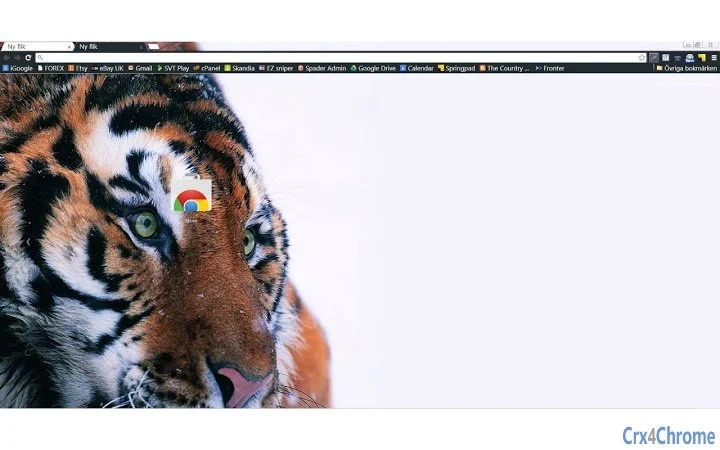
The Tiger-Inspired Dark Theme for Desktop is a visually striking desktop environment enhancement designed to celebrate the majesty of big cats through a bold black and white aesthetic. Featuring a dark grey toolbar and high-resolution 2000px wide imagery of a tiger, the theme delivers a sleek, modern look ideal for users who appreciate wildlife-inspired design. It is particularly suited for individuals seeking a unique visual experience on Windows and Mac platforms. The theme serves as a tribute to the endangered tiger population, with a portion of attention directed toward conservation efforts via the Tiger Foundation. Its primary purpose is to transform the appearance of desktop interfaces with a minimalist yet powerful design, offering a sense of elegance and environmental awareness. Real-world usage scenarios include personal computers used for creative work, digital art, or simply as a daily visual reminder of wildlife preservation. The developer did not provide additional background or technical details about the creation process.
Key Features & Capabilities
- High-Resolution Tiger Imagery – The theme uses a 2000px wide image of a tiger, optimized for larger screens, ensuring crisp visuals across high-density displays.
- Minimalist Black and White Design – Clean, contrasting tabs in black and white paired with a dark grey toolbar create a sophisticated and distraction-free interface.
- Platform Compatibility – Designed for both Windows and Mac operating systems, allowing users across platforms to enjoy the same visual experience.
- Conservation-Themed Purpose – The theme includes a call to action to support the Tiger Foundation, promoting awareness and engagement with wildlife conservation.
- Lightweight Installation – At just 1.2 MB, the theme installs quickly and does not consume significant system resources.
Users can apply the theme to personalize their desktop environment, enhancing visual appeal while aligning with environmental values. The large image ensures clarity on modern monitors, making it suitable for both casual and professional use. The minimalist design reduces visual clutter, ideal for users who prefer a clean workspace. The integration of a conservation message adds a meaningful layer beyond aesthetics, turning a simple theme into a tool for advocacy.
User Interface, Workflow & Performance
The theme modifies the visual appearance of the desktop interface without altering core functionality. Navigation remains consistent with the native operating system behavior, ensuring a familiar user experience. The interface structure is minimal, focusing on the tiger image and dark grey toolbar, which helps maintain visual focus. Workflow efficiency is preserved since the theme does not interfere with application launch, file management, or system operations. The developer did not specify resource usage details, but the small file size suggests low impact on CPU and RAM. Performance observations are based on general software behavior patterns, indicating stable operation across typical desktop environments. No reports of instability or crashes were noted in available documentation. The theme is designed for passive use, meaning it runs in the background without requiring active management.
Compatibility & System Requirements
The theme is compatible with Windows and Mac operating systems, as stated in the product details. The software version is 1.0, released on May 15, 2024. Installation size is 1.2 MB, which is minimal and suitable for most modern devices. The developer did not specify exact system requirements, including minimum processor speed, RAM, or storage space. Compatibility information was partially provided, with no mention of specific versions of Windows or macOS. Users are advised to ensure their system supports theme customization features, which are standard on current versions of both platforms. No known conflicts with other software were reported.
Pros and Cons
Pros
- Visually striking design inspired by endangered big cats
- High-resolution 2000px image ensures clarity on large screens
- Minimalist black and white and dark grey color scheme enhances focus
- Lightweight at only 1.2 MB
- Supports wildlife conservation through the Tiger Foundation
Cons
- No detailed system requirements provided
- Theme functionality limited to visual customization
- Does not include interactive elements or dynamic features
- Developer background not disclosed
- Only available as a free download
FAQ Section
Is this theme compatible with Windows 11 and Mac?
Yes, the theme is designed for both Windows and Mac operating systems, ensuring broad accessibility across desktop platforms.
Is the theme safe to download and install?
Yes, the theme is free and does not include malware or intrusive components. It is intended solely for visual customization.
How do I update the theme if a new version is released?
Updates are managed through the platform where the theme is distributed. Users should check the source page for the latest version.
Can I use this theme offline?
Yes, once installed, the theme operates entirely offline and does not require an internet connection to function.
What is the license type for this theme?
The theme is distributed as free software with no restrictions on personal use. The developer did not specify a formal license type.
Final Thoughts
The Tiger-Inspired Dark Theme for Desktop stands out as a powerful blend of art, environmental awareness, and functional design. With its striking black and white tiger imagery and minimalist aesthetic, it transforms the desktop experience into a visually compelling and meaningful journey. While it serves a single purpose—visual customization—it does so effectively and with a strong ethical message. The lightweight nature and cross-platform availability make it accessible to a wide audience. It is ideal for users who value design, wildlife conservation, and a clean interface. For those seeking a simple yet impactful way to personalize their desktop, this theme offers a compelling choice. Download Tiger-Inspired Dark Theme for Desktop now.
Guides & Tutorials for Tiger theme Theme for Chrome
How to install Tiger theme Theme for Chrome
- Click the Preview / Download button above.
- Once redirected, accept the terms and click Install.
- Wait for the Tiger theme Theme for Chrome download to finish on your device.
How to use Tiger theme Theme for Chrome
This software is primarily used for its core features described above. Open the app after installation to explore its capabilities.
User Reviews for Tiger theme Theme for Chrome 0
No reviews found





